Blog

  • 10 Proven Ways to Find Freelance Work Online Using Your Portfolio

    10 Proven Ways to Find Freelance Work Online Using Your Portfolio

    Are you tired of looking for freelance work online? You shouldn’t be! You can find new freelance work online using these effective marketing strategies. It doesn’t matter if you are a freelance web developer, freelance web designer, or freelance SEO. These tips can work for anyone looking to get new freelance work online.

    It is frustrating sometimes for talented freelancers to find new work through job bidding sites.

    Bidding sites work well for some freelancers. However, it is a nightmare for most freelancers to get decent work online.

    I am not against job-bidding sites in any way. It is, no doubt, a great way to find freelance work online. In fact, you can establish your freelance business working there.

    Thousands of freelancers are making a crazy amount of money through freelancing platforms.

    According To Wikipedia:

    Upwork has twelve million registered freelancers and five million registered clients. Three million jobs are posted annually, worth a total of $1 billion USD, making it the world’s largest freelancer marketplace.

    Maybe, you are not supposed to be working on Upwork? Or perhaps you have already tested job bidding websites and are still not able to find a decent client. Don’t worry; you are not alone.

    Due to immense competition and higher commission rates, most freelancers ditch these websites sooner or later.

    I am sure you must have excellent skills, but you might be unaware of how to promote your freelance business.

    That’s the problem with many freelance businesses. They are horrible marketers. Most freelancers don’t know how to promote their business online as they should.

    Do you rely on freelance job websites to get new work?

    If you leave your day job to become a full-time freelancer, then at least ensure you can find clients on your own instead of relying on some service to make that happen for you magically.

    I have read many scary freelancer stories in which job bidding sites banned their accounts without giving a justified response. You can search for those stories with a quick Google search. I am not here to complain about those specific websites.

    If you depend on job networks to get work, my friend, you are still not freelancing! You are an employee of those sites.

    Treat Your freelance business as an independent business, not a 9–5 Job.

    How to Find Freelance Work Online?

    First, let me tell you that freelancing is not a magical way to make you quickly rich. It won’t make you rich, and it is not easy. It is just as tricky as your day job or running an offline business.

    Here is a step-by-step process to get more freelance work online:

    1. Create a Professional Portfolio Website

    If you haven’t set up your online portfolio, create one now. That is the best investment you can make. A portfolio will help you get more freelance work online.

    I would advise you to hire a professional web developer to create a website. A well-made professional portfolio will give a great first impression to your potential client.

    However, if you cannot afford to hire a web developer (like me), then you can create your website. It probably won’t be perfect (unless you’re a web developer), but it will tell your clients that you’re serious about your work.

    Optimize your website to load faster. Add as much information about your business, previous clients’ testimonials, case studies, sample works, contact forms, and, most importantly, a blog. With a blog, you can promote your freelance business.

    2. Find Freelance Work with Cold Email Outreach

    No, please don’t send thousands of spam emails to strangers. You will only waste your time.

    If someone is going to spend his money, he most likely doesn’t want to lose that money on a stranger who has sent him an impersonalized spam email.

    You should send targeted emails to a very focused group of people. Make all those emails personalized to each prospect.

    Promote your freelance business online

    Keep these essential points in mind when creating an email outreach campaign:

    1. Create concise email messages.
    2. Each message should be specific to each potential client.
    3. Ask a question at the end of your email.
    4. A great personalized Subject line matters a lot.
    5. Don’t include your portfolio links in the email message. Instead, use a signature at the end of the email with your portfolio and contact information.

    3. Get Freelance Work with Cold Calling

    Cold calling is quite an old marketing method, which has a lot of benefits. You can pick up a phone and start dialing the numbers of the nearest businesses that can benefit from your services.

    Illustration by H. Stratton

    I personally never tried cold calling yet, but it worked for some freelancers I know. It can work for you too, but it will take a lot of time to learn how to convince strangers to listen to you.

    You decide which strategies work best for you according to your skills and capabilities.

    To get a better perspective on this topic, read this, this, & this article.

    Before you take that route, get ready for many rejections, my friend!

    4. Use Blogging to Find Freelance Work Online

    Create a blog on your portfolio website. On a blog, you can share your services, case studies, artwork, and customer stories or use your blog to inspire people in your field.

    You can do many different things on a blog to promote your freelance business. However, always remember that you can bring potential clients with blogging. You have to know your client’s pain points, and you should write about them on your blog.

    After that, learn basic SEO and do proper keyword research. Find keywords your potential clients search for and start writing on those topics.

    It is a slow process to get the word out, but if you keep making new connections with people and promoting your content, you will start getting emails from clients you want to work with.

    5. Guest Posting on Industry Related Blogs

    Your competition is your best friend to help you get a lead or two for your business. Build connections with influential bloggers in your industry. You can follow them on social networks. Get in touch with them and ask questions about your industry-relevant topics.

    After that, you can send an article pitch on a specific topic. They will most likely say yes if you have a credible business blog of your own and a portfolio to back up your claims.

    Please make sure to leave a link to your website in the author bio of the blog. So people can read more about your business and your other blog posts.

    6. Group & Forum Postings

    You should join your industry-related forums, blogs, and groups in whichever field you choose to become an expert in. You can also join groups on LinkedIn, Facebook, and subreddits.

    There must be countless forums in your industry where you can collaborate with like-minded people, help people, and make connections.

    Freelancing is more about building connections rather than creating a portfolio.

    A portfolio would help, but connections can take your freelance business to a new level.

    7. Get Freelance Work using Online Job Boards & Classifieds

    There are local classified job boards in every major city and country. You can post your services and reply to the job posting on these job boards and classified websites.

    I haven’t personally tested this method, but here’s a good Reddit thread on this topic on /r/freelance. Please give it a read and try it. Let me know in the comments below if you get a good response with this method. I will update the post.

    8. Local Networking to Find Freelance Work

    You will do great in connecting with people at local networking events if you are a people person. There are a lot of networking events going on in different parts of the world.

    You can join any events you like and make business connections with people in your industry and other like-minded people.

    You have to run with the pack (Internet Archive)

    These connections will help you build your professional network. Please stay connected with them through social events, meetups, and social networks.

    Please check out these articles on local networking. These may help you get a good start at networking:

    1. An Introvert’s Guide to Networking
    2. Meet the Right People

    9. Use Google Ads to Get More Freelance Work

    This is not personally tested, but many web design and marketing agencies use this approach to get projects. It is probably not a good idea if Internet marketing is not your strong suit, but if you have money to spend on growing your business, then Google ads are worth a try.

    Before setting up an Ads campaign, there are a couple of guides and articles you should get through to understand how it works.

    1. Google Ads Guide
    2. Free Google Ads Certification course

    10. Social Networking to Find Online Jobs

    Freelance businesses rely on building new connections. So, if you haven’t already set up and activated your social profiles, please do them now.

    Join relevant to your business groups on LinkedIn, Google+, Facebook, and Twitter.

    Connect with like-minded people, and help other people learn a thing or two. Show them who you are and what you are good at.

    • Mention on your social profiles in the about section that you are a freelancer.
    • Regularly create new content on all your social media accounts.
    • Engage with prospects in groups and find them through relevant hashtags.
    • Show them your expertise by sharing success stories from your past experiences.

    There are many ways that one can use to improve a freelance business.

    Whichever of these above mediums works for you. Please consistently deliver your best work to clients and build relationships with them. Your clients are your customers; making them happy will bring more work and referrals.

    This article can benefit many other businesses that rely heavily on building connections. So, if you think you and your friend’s business can use some of these techniques to promote online businesses, please don’t forget to share this article.

    If you’re a Pakistani freelancer, check out my post on how to receive online payments in Pakistan.
  • How to Generate Internet Connection Logs on Windows Computer?

    How to Generate Internet Connection Logs on Windows Computer?

    If you want to monitor Internet connection logs on your windows computer constantly, this command will save you a lot of time and headache. You can create a log file to help you troubleshoot connection problems, or you can send them to your Internet connection provider to understand the problem.

    Steps

      • Click on Start Menu, search for the command prompt or write “CMD” in the Start menu search box.
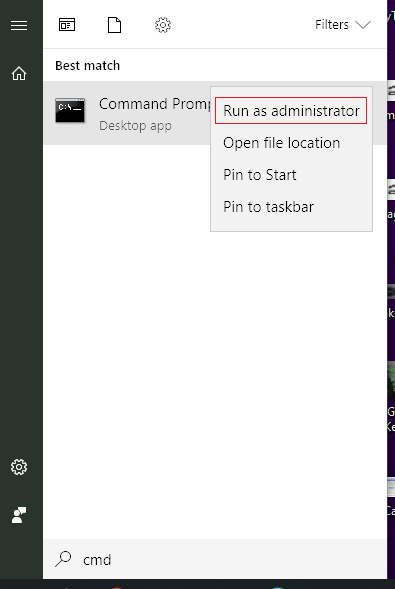
      • Before opening the Command Prompt, you should run it as an administrator. Right-click on the command prompt icon in the start menu.
      • Click on the option run as administrator.
    Run Command Prompt as an Administrator
    Run Command Prompt as an Administrator
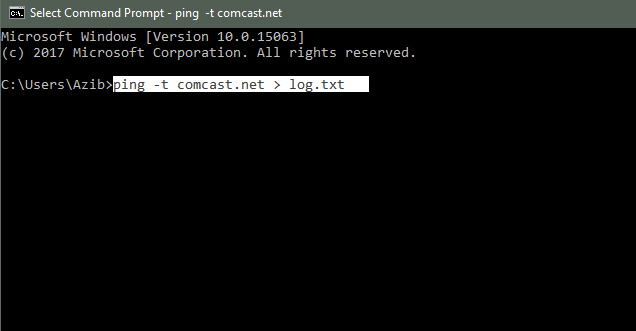
      • Now you need to type this command to generate a log.txt file.

    ping -t comcast.net > log.txt

    To Generate Internet Connectivity logs type this command
    To Generate Internet Connectivity logs, type this command
    • This command will generate a file in your current directory, which in my case is C:\users\Azib.
    • You can change the directory to something other by using the command “CD directory path.” Let’s say you want to save this log file to your C drive root folder. So you will type the command “CD C:\.”
    • Go to C Drive from the “My Computer” or “This PC” folder, depending on your Windows OS version.
    • Find the folder “users” and then “azib”; you will find the log.txt file.

    Leave it running this command in the command prompt as long as you want to capture the logs. Close the command prompt and delete the log file when you are done.

  • How to Spot a Fake Micro SD Card Before Buying One?

    How to Spot a Fake Micro SD Card Before Buying One?

    Micro SD cards don’t cost much, but buying a fake one would cost you time. To save you from that frustration, I will share an easy process to spot a fake Micro SD card.

    If you can’t afford to buy a micro SD card, check out this post on how to free up storage on your android device.

    Never Buy Cheap Fake Micro SD Cards

    Of course, an original micro SD card costs more than the fake one. You first need to know that you should not purchase any cheap counterfeit micro SD card from an unknown vendor. Always buy from a reputable store, whether it’s online or offline.

    Before buying your Micro SD card, you should install SD Insight on your Android device. In my city, finding a legit micro SD card is difficult. I have also used this same method to test the SD card.

    Use SD Insight App to Spot a Fake Micro SD Card

    SD insight is a helpful and free app you can install on any Android device. It will display the SD card manufacturer information, model number, and the original capacity of an SD card. You have to insert an SD card into your android device and run this app.

    This information will help you spot a fake micro SD card right away.

    Step 1: Download this app on your Android device by going to Google Play and typing ‘SD Insight’ in the search box.

    Step 2: Once installed on your device, you have to insert the micro SD card and run this application.

    Step 3: It will show you plenty of information about your device’s internal storage (MMC Card) and external SD card. Since we only want to test the external SD card, we will tap on the SD Card option from the top menu.

    Now you should check for these things manually.

    Manufacturer & Production Date

    Check both manufacturer information and the production date. Some SD card manufacturers don’t manufacture their chips, such as Kingston.

    However, it would help if you looked up the manufacturer’s name on Google. I bought the Kingston SD card, so when I saw the manufacturer information, it wasn’t mentioned Kingston in the manufacturer. So, when I look it up, I found that it is, in fact, a company that manufactures Kingston SD card chips.

    Model Number on Your Packaging

    You Should check the model number match the one mentioned on your SD card packaging. If it’s not, then you probably have a fake micro SD card.

    Card Capacity (Storage)

    In your SD Insight app, check that it mentions the card’s correct capacity. For instance, if you have purchased a 64 GB SD card, it should clearly say that.

    There are several other methods to spot a fake micro SD card, but for them, you need a laptop. I hope you find this post helpful. Let me know in the comments what other methods can be used to spot a fake SD card.

  • How to Easily Free Up Storage on Your Android Device?

    How to Easily Free Up Storage on Your Android Device?

    If you constantly run out of space on your android device, you should check out these simple tips to free up more storage on your Android phone.

    The simple solution is to buy a new Micro SD card to increase the storage on your device. However, for some reason, if you can’t buy a new SD card, here are some valuable tips to free up storage.

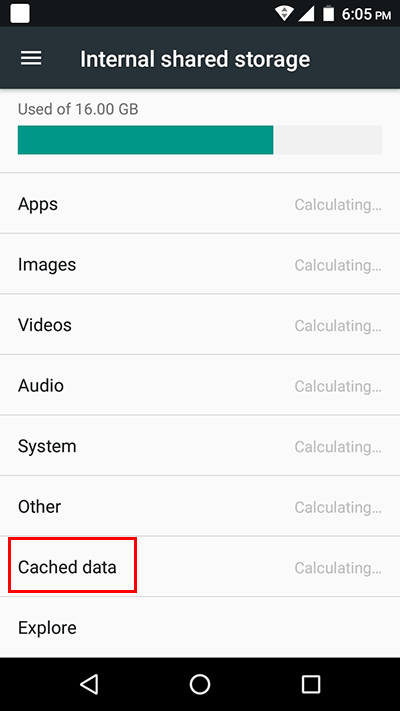
    First of all, you should check how much storage has been used by your apps and media files from settings > storage.

    remove cached data

    You can use that storage option to remove some unimportant files, media, and apps. Also, you can try out these methods to get more space on your device.

    Remove Cached Data from Apps

    One of the most annoying thing about Android is that it caches a lot of data in apps such as YouTube, Instagram, Facebook, etc… Caching that data help Android applications load faster. That’s why we see a lot of apps hog storage and memory.

    You can find an option to clear Cached data from Settings > Storage > Cached Data. Tap OK when it asks for confirmation.

    This will free up much storage on your device (depending on the device’s usage).

    Backup Your Photos to Cloud or PC

    If you take a lot of selfies and photographs from your phone, you should back up your photos somewhere safe. You can use cloud storage such as Dropbox, Google Drive, or Google photos. You can also save them on your laptop.

    After backing up your photos, you can remove them from your device storage. I use Google Photos, which handles this pretty seamlessly. It comes with both options; if you want to keep the quality of your photos, then you should consider buying more storage from Google. https://one.google.com/storage

    Remove Unused Apps

    Are there any apps on your Android phone which you never use? I had some apps I installed for some reason, but then I forgot about them.

    You can find apps you don’t use and uninstall them immediately. It will save you a couple of hundreds of Mbs on your device storage.

    Use Files from Google

    It is a new Android app by Google to help you manage files and keep your device storage healthy. It has several options to choose from. When you first run this application, it will scan unnecessary files and folders and give you a chance to remove those junk files and free up more space on the device.

    Also, if you give Google Files permission, it can track which apps you don’t use and give you a notification to uninstall those unused apps.
    https://play.google.com/store/apps/details?id=com.google.android.apps.nbu.files&hl=en

    Buy an SD Card

    So, if you are one of those who keep all their media files on an Android device, you must buy an SD card. I recently purchased a 128 GB SD card because I had a lot of media files on my device.

    Whichever SD card you buy, always buy it from a reputable vendor. There are a lot of fake SD card manufacturers, so you should be wary of them. Please read my article on how to spot a fake micro SD card before buying one.

    Use Cloud Storage

    If you save a lot of files on your device, you can sync all of them to your cloud storage. Using cloud storage is the easiest way to keep your device free from unnecessary data.

    Google gives 15 gigs of free cloud storage with every account, so you might as well use it. When you find a good use for that space, you can always buy more storage from Google.

    Similarly, you can try Dropbox. It is another cloud storage option to choose from. It comes with a free account; you can upgrade it to get more storage.

    I hope you find this post helpful. Let me know in the comments what other methods you use to free up Android device storage.

  • How to Easily Receive Online Payments in Pakistan ?

    How to Easily Receive Online Payments in Pakistan ?

    Do you want to receive online payments from your clients outside of Pakistan? If the answer is yes, check out these easy payment methods to receive your online payments on time.

    Many freelancers in Pakistan are facing difficulty receiving payments from International clients. The main issue is that most overseas clients use Credit Cards or PayPal to pay online.

    PayPal doesn’t work in Pakistan and credit cards can only be accepted if you have a local merchant account.

    However, other reliable payment solutions exist which can be used to receive online payments in Pakistan.
    Please read my previous post on how to find more freelance work using freelance job websites.

    Receive Online Payments in Pakistan

    I have used these payment methods myself and had no problem whatsoever. When creating accounts on any of these websites, keep these things in mind to get payments on time and with reliable service.

    • Use your real name mentioned on your CNIC and Passport when you create a new account on Payoneer, Xoom, etc.
    • When they ask you to verify your accounts, always provide accurate details. If you hide things, they have a legitimate reason to block your account.
    • Sometimes payment gets delayed due to weekends and holidays. Don’t get panicked; you will receive your payment on time.
    • Make sure to use as many of these payment methods, so your clients have multiple options to pay you.

    1. Wire Transfer

    How to send wire to pakistan

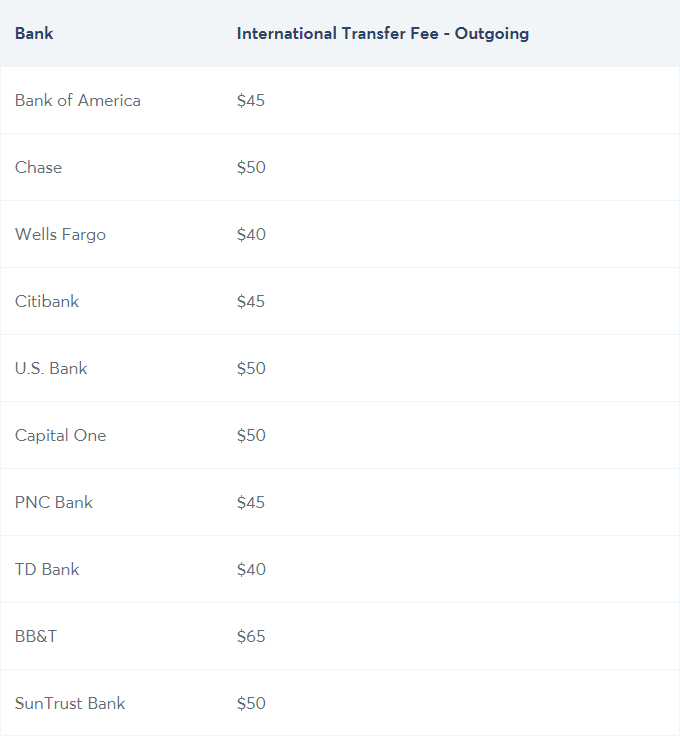
    This is a solution if your client has to send a significant payment (around $1000 at least). Because the client has to pay an international wire transfer fee between $10 — $100. Different banks charge different international wire transfer fees.

    Wire transfer fee of banks in the USA

    So what do you need to do to receive an international wire transfer outside Pakistan?

    You need to provide these details to your employer/client:

    IBAN Wire Transfer

    • Full Name
    • IBAN Number
    • Bank Name

    Swift Wire Transfer

    • Full Name
    • Bank Account number
    • Swift Code
    • Bank Name
    • Branch Name
    • Branch Code

    Note: You may need to call your bank to get a swift code, branch code, full branch name, etc.

    You will receive payments within 1–5 business days. Since Pakistan has been included in the FATF grey list recently, it might take more time. But don’t worry, you will receive the payment.

    2. Payoneer

    Payoneer

    You can say that it is the closest alternative to PayPal in Pakistan. However, it is not profoundly used by people from western countries, but you can send your client a payment request.

    Your client can pay you via debit/credit card or ACH transfer.

    Payoneer supports most countries, but there are a few countries and some US states from which you can’t receive a payment.

    The payments can take around a week to get into your bank account. First, the payment will be loaded to your Payoneer account. Then you must add your local Pakistani bank details to receive that payment directly into your account.

    Also, you can use their debit card to withdraw payments immediately through ATMs in Pakistan. I won’t recommend using their debit card because they charge an unreasonable transaction fee.

    3. Xoom by PayPal

    Xoom money transfer service

    Although you can’t receive business transactions using Xoom because it is a service to only send a remittance from the United States.

    I wouldn’t recommend Xoom as a standard payment method if you are a freelancer. Because things can go wrong if they find out you are using it for business purposes rather than collecting remittance from family/friends.

    If you want to use it, you have to provide these details:

    • Official Bank Name
    • IBAN
    • First Name
    • Last Name
    • Address
    • Region
    • Province
    • Postal Code
    • Email
    • Phone

    4. Western Union

    Western Union

    Western Union is probably the oldest among these newcomers. You can easily collect payments sent through Western Union by going to a bank and showing your CNIC and MTCN.

    • A sender can directly transfer money to the receiver’s bank account
    • You can collect cash or cheque from authorized agents of Western Union eg: Various banks, Post Offices, and Merchants.
    • You can check your nearest Western Union agent by entering your postal code on the Western Union website.

    Let me know in the comments what other payment options you have used personally and how to make this blog post more informative for freelancers in Pakistan.

    If you want to buy any book in Pakistan, check out my post.

  • Why I Switched from Windows 10 to Linux Mint? [Review]

    Why I Switched from Windows 10 to Linux Mint? [Review]

    I have been using Windows for almost ten years. I have used many versions of Windows OS now. However, I was not very pleased with the latest Windows 10 due to tracking, advertising, constant updates, crashes, etc. So, I installed a Linux distro and was hooked on it right after the installation.

    The experience was quite pleasant (which I didn’t expect). I have used Ubuntu and some other distros in the past, but it was quite a difficult process back then to install any Linux distro. Things are different now; I think it is a perfect time to move to Linux Os.

    Why I Preferred Linux Mint Over Many other Linux Distros?

    A few things which I find interesting about Linux Mint:

    • It is one of the most popular Linux distros, according to Distrowatch.
    • Linux Mint is entirely free, just like many other Linux distros. However, if you like it, please consider donating to the Linux Mint development team.
    • Reviewers of Linux distros suggested Linux Mint over other Linux distributions because it is easier to use, especially for users switching from Windows to Linux.

    These were the few things that I read online, and I thought, why not give it a try? What worst could happen?

    Switching from Windows 10 to Linux Mint 19 Cinnamon

    So, I downloaded the Linux Mint ISO image from their official website. Read this installation guide and started writing the ISO image on my USB.

    I picked up my old laptop, ‘ASUS X555UA‘, and installed it immediately.

    The installation procedure was faster and far better than any Windows OS I have used.

    When I was about to install the Linux Mint, I thought it would take a couple of hours.

    However, Linux Mint installation was one of the most straightforward OS installation processes I have experienced. After clicking two or three times, the installation was finished.

    The first thing I noticed about Linux Mint was that it wasn’t as ugly as I expected. I used Ubuntu Linux 5–6 years ago, so you can probably relate to my expectations.

    The Linux Mint installation process already installed every hardware driver. So, I didn’t even have to install drivers or anything. I plugged in my external mouse, keyboard, and monitor, and the OS detected everything without a single issue. Wow, it is a much superior experience to Windows.

    I installed the Chromium browser, updated a few software, and started using it. It’s been almost a week, and I haven’t touched my Windows laptop.

    I recommend Linux Mint to anyone who is fed up with spyware, viruses, and crashes. This Linux distro is particularly very user-friendly for Windows users. However, your opinion might be different if you are an advanced Linux user. Give it a try, and let me know how you find it in the comments below.