Blog

  • How to Block YouTube Ads on Android?

    How to Block YouTube Ads on Android?

    Are you tired of those annoying ads popping up while you’re trying to enjoy your favorite YouTube videos on Android? We hear you! That’s why I’m excited to share with you Revanced APK. You can block YouTube ads on your Android device forever.

    What is Revanced APK?

    Revanced is an open-source project for Android devices that can help you patch the app experience. It’s main purpose is to enrich the user experience of any app by blocking unwanted ads, and add features that users want to see in the app.

    Revanced patches can be installed on many apps other than YouTube, including, Reddit, Facebook, Twitter, and more.

    In this tutorial, we will only be using the YouTube patching to help you watch YouTube ad-free on your Android without paying for YouTube Premium.

    How to Block Ads on YouTube Android?

    First, you need to install the Revanced apk. Unfortunately, you can’t find this app on the Google Play store, because this app doesn’t align with Play Store policies.

    How to Install Revanced Manager APK on Your Android Device?

    Step 1: Download the Revanced APK from the official website on your Android device.
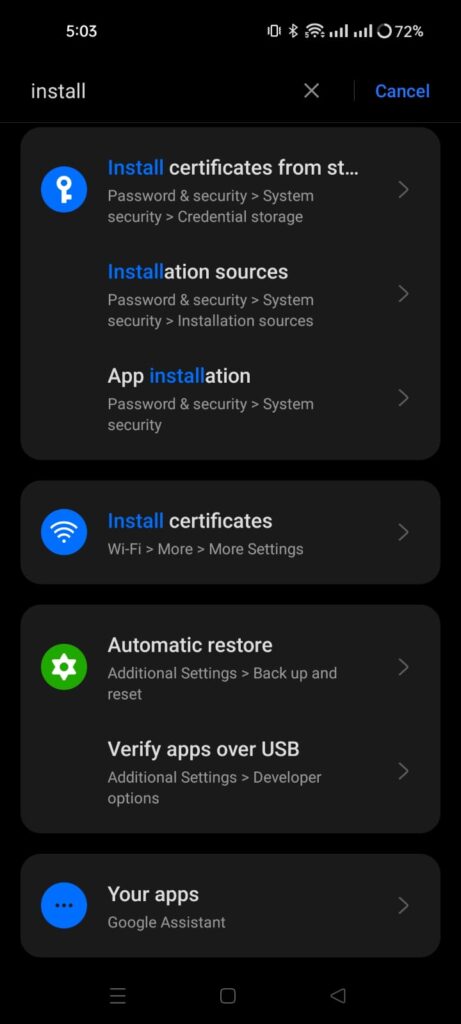
    Step 2: Go to your device settings and enable installation from unknown sources. You can also locate this setting on your device by going to Settings > Search Installation sources.

    Step 3: Open the downloaded Revanced Manager app and follow the on-screen instructions to install Revanced APK on your Android device.

    How to Patch YouTube APK on Revanced
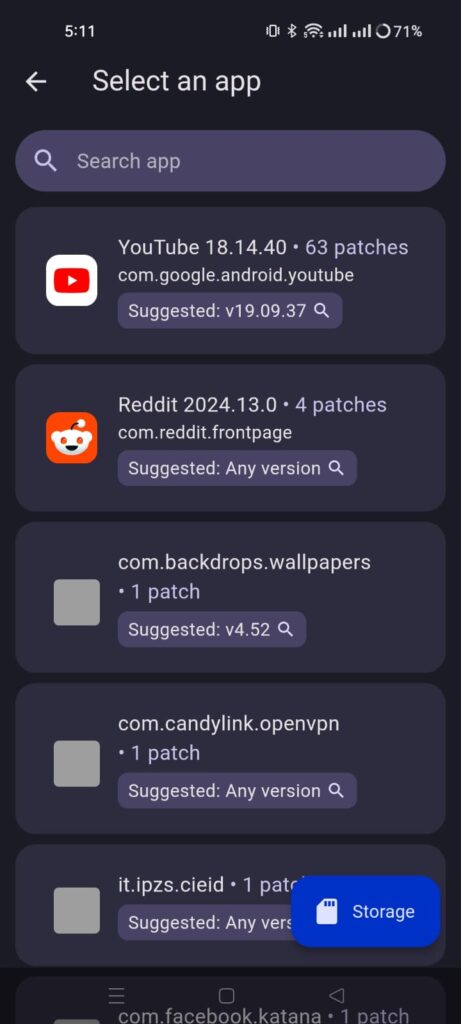
    Step 1: Open the app, and tap on Patcher. Select an app. This will suggest you a YouTube app version that you need to install to apply patches. Click on the Suggested app version. It will open a search window, go the first site apkmirror and download the app.

    Step 2: Don’t install the YouTube app yet. Go to the Revanced Manager, tap on Patcher again. Tap on Select YouTube app. It will ask you to Select from storage. Locate the YouTube app you downloaded in last step, from your phone’s internal storage.
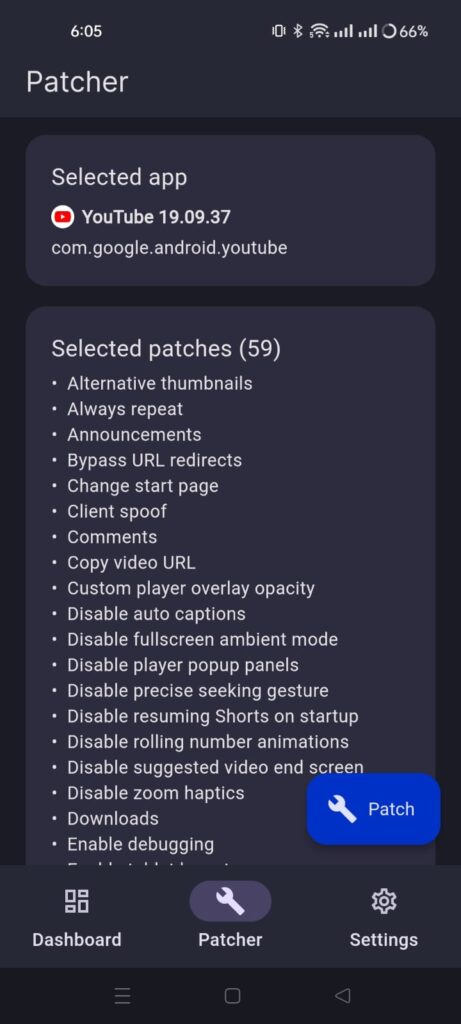
    Step 3: Configure the patches you want to apply. I suggest keep the default selected patches and tap on Patch button.

    Step 4: It will take some time to patch the YouTube app. Once it’s done, It will ask you to install this app on your device. Android might ask you to enable installation from unknown sources for this app. Give the permission, and install the app.

    Step 5: When you first open the app, Revanced YouTube app might ask you to download MicroG services app. This app will let you sign in to your YouTube’s account. So, download and install the app. It will make the YouTube experience even better for you.

    Now, you can enjoy the YouTube ad-free experience on Android. It will block all the YouTube ads on your Android device. You can also customize the app, add or remove features that you don’t use.
  • How to Fix “Aw, Snap!” Error in Google Chrome?

    How to Fix “Aw, Snap!” Error in Google Chrome?

    The “Aw, Snap! Something Went Wrong” error is a frustrating issue encountered by many Google Chrome users.

    This error typically indicates a problem with the browser’s rendering engine or a conflict with extensions, plugins, or browser settings. In this guide, I will help you resolve the “Aw, Snap!” error and get Google Chrome back to working condition.

    Reload the Page

    Sometimes, the “Aw, Snap!” error occurs due to temporary network issues or a glitch while loading a webpage.

    Simply click on the reload button or press Ctrl + R (Cmd + R on Mac) Chrome Shortcut to refresh the page and see if the error persists.

    Check Internet Connection

    One of the common reasons for encountering the “Aw, Snap! Something Went Wrong” error in Google Chrome is an unstable or interrupted internet connection.

    Make sure that your device has a stable and functioning internet connection is crucial for loading pages correctly.

    • Start by verifying that your device is connected to the internet. Look for the Wi-Fi or cellular data indicator on your device’s status bar to confirm the connection status.
    • Alternatively, try accessing other online services or websites to check if your internet connection is working properly.
    • If you’re using Wi-Fi, make sure you’re within range of your router and that the signal strength is adequate. Consider restarting your router or modem to resolve any potential connectivity issues.
    • If you’re using a cellular data connection, ensure that mobile data is enabled on your device and that you have sufficient signal strength. You may need to move to an area with better network coverage if the signal is weak or unstable.
    • If you’re using a public Wi-Fi network, such as in a coffee shop or airport, ensure that you’ve successfully connected to the network and accepted any terms of service or login requirements.

    Disable Extensions

    • Extensions such as Ad Blockers can sometimes conflict with Chrome’s rendering engine and cause the “Aw, Snap!” error.
    • Open Chrome and go to chrome://extensions/.
    • Disable all extensions by toggling the switch next to each extension to the off position.
    • Reload the webpage and see if the error is resolved. If so, re-enable extensions one by one to identify the problematic one.

    Clear Browsing Data

    Cached files and cookies may sometimes interfere with Chrome’s functionality, leading to the “Aw, Snap!” error.

    • Go to Chrome settings by typing chrome://settings/ in the address bar.
    • Scroll down and click on “Advanced” to expand advanced settings.
      Under “Privacy and security,” click on Clear browsing data.
    • Select the time range and the types of data you want to clear (e.g., cookies, cached images and files) and click Clear data.

    Update Chrome

    • Outdated versions of Chrome may contain bugs or security vulnerabilities that can trigger the “Aw, Snap!” error.
    • Check for Chrome updates by clicking on the three-dot menu icon > Help > About Google Chrome.
    • Chrome will automatically check for updates and install them if available. Restart the browser after updating.

    Reset Chrome Settings

    Resetting Chrome settings to their default values can help resolve underlying configuration issues causing the error.

    • Go to Chrome settings by typing chrome://settings/ in the address bar.
    • Scroll down and click on “Advanced” to expand advanced settings.
    • Scroll down to the “Reset and clean up” section and click on Restore settings to their original defaults.
    • Click Reset settings to confirm and restart Chrome.

    If none of the above methods work, reinstalling Chrome can often resolve persistent issues.

    Uninstall Chrome from your computer through the Control Panel or Settings app. Download the latest version of Chrome from the official website and install it.

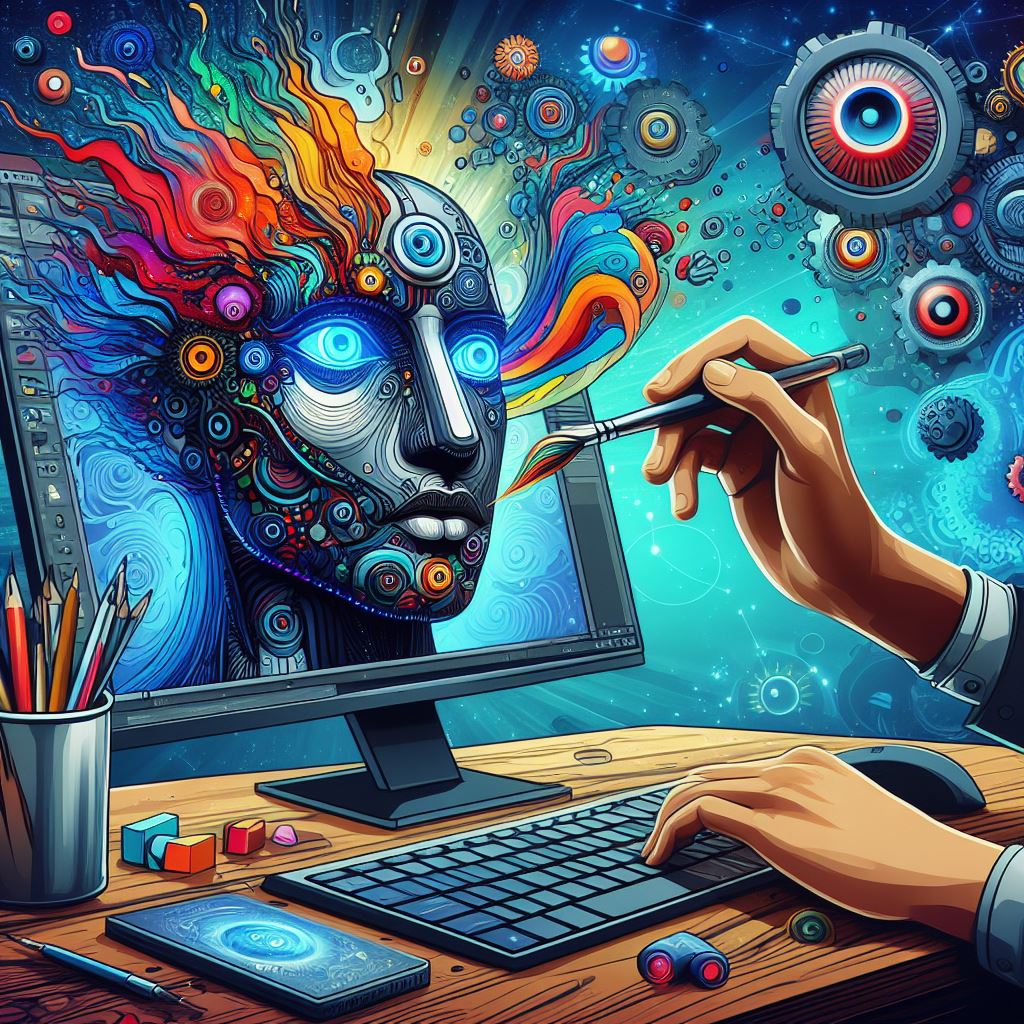
  • AI Content Creation Tools for Windows: Revolutionizing Digital Creativity

    AI Content Creation Tools for Windows: Revolutionizing Digital Creativity

    Are you looking for AI content creation tools that you can use on Windows?

    Whether you’re a seasoned professional or an aspiring creator, using the power of artificial intelligence can take your content creation to new heights.

    In this article, I will cover a range of AI-powered content creation tools specifically designed for Windows users, revolutionizing the way we produce and consume digital content.

    The Rise of AI in Content Creation


    Artificial intelligence has made significant impact in recent years, in various aspects of our daily lives.

    In the days of content creation, AI algorithms are being leveraged to automate tasks, improve creativity, and streamline workflows.

    From generating text and designing graphics to editing videos and composing music, AI-powered tools offer great capabilities that can only improve human creativity and efficiency.

    Text Generation and Editing


    One of the most notable applications of AI in content creation is text generation and editing.

    Tools like ChatGPT have demonstrated remarkable proficiency in generating human-like text based on prompts provided by users.

    Jasper is a favorite among businesses for generating all kinds of content for marketing. It’s great for making blog posts, but it can also help you create social media posts, articles, emails, ads, and more.

    Writers and bloggers can leverage these AI models to brainstorm ideas, draft articles, or even automate routine writing tasks.

    Also, AI-driven grammar and style checkers can help polish content, ensuring clarity and coherence.

    Graphic Design and Image Editing


    For graphic designers and visual artists, AI-powered tools offer many of creative possibilities.

    Platforms like Canva and Adobe (latest version) have integrated AI functionalities for tasks such as image enhancement, object removal, and intelligent cropping.

    Furthermore, specialized tools enable designers to explore generative art and create visually stunning compositions using AI algorithms. Bing’s Copilot, DALL-E2, and Midjourney are quite helpful in this regard.

    Video Production and Editing

    In the realm of video production, AI technologies are revolutionizing the editing process and opening doors to innovative storytelling techniques.

    Software like Adobe Premiere Pro and Davinci Resolve leverage AI for tasks such as scene detection, color grading, and motion tracking, allowing filmmakers to streamline their workflows and achieve professional-quality results.

    Moreover, AI-powered video synthesis tools enable users to generate lifelike avatars, deepfake effects, and dynamic visual effects with ease.

    Music Composition and Audio Editing

    Musicians and composers can also benefit from AI-driven tools that assist in music composition, arrangement, and production.

    Platforms like SounDraw and Beatoven use machine learning algorithms to generate original musical compositions tailored to specific genres, moods, and instrumentation preferences.

    Additionally, AI-powered audio editing software enhances sound quality, removes background noise, and simplifies the mixing and mastering process for audio professionals.

    Integration with Windows Ecosystem

    Many AI-powered content creation tools are designed to seamlessly integrate with the Windows ecosystem, offering native support for Microsoft’s operating system.

    Whether you’re using a desktop PC, laptop, or tablet running Windows, you can access a diverse array of AI-driven software solutions through the Microsoft Store or third-party vendors.

    Moreover, advancements in cloud computing and edge AI enable users to harness the power of AI algorithms directly on their Windows devices, without relying on external servers or internet connectivity.


    As AI continues to evolve and permeate every facet of our digital existence, content creators have unprecedented opportunities to push the boundaries of creativity and innovation.

    By leveraging AI-powered content creation tools on Windows platforms, individuals and organizations can streamline workflows, amplify productivity, and unleash their creative potential like never before.

    Whether you’re a writer, designer, filmmaker, or musician, embracing AI technologies can transform your artistic vision into reality, shaping the future of digital content creation in profound ways.

    Embrace the power of AI and embark on a journey of endless possibilities in the realm of content creation on Windows.

  • How to Fix VLC (Direct 3D11 output) Error in VLC Media Player?

    How to Fix VLC (Direct 3D11 output) Error in VLC Media Player?

    If you see VLC (Direct 3D11 Output) error when you play any video file, here’s a simple solution to fix this issue.

    I experience Direct 3D11 Output issue quite randomly. I usually don’t use VLC on PC, but to watch a video tutorial sent by a client, I had to play this file through VLC.

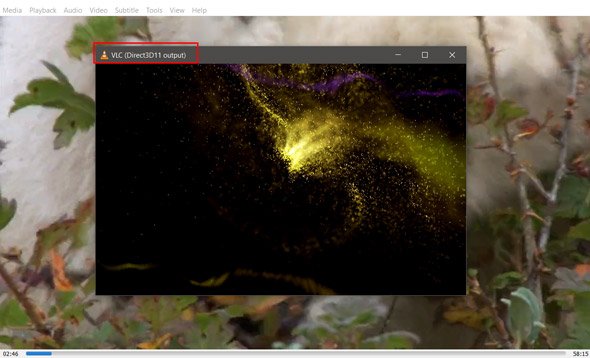
    When I played this file; I saw audio visualizations but no video output. I thought, maybe this file got corrupted, I tried different video files in various formats, and this (Direct 3D11 Output) error wasn’t going away.

    Here’s a screenshot of the actual error:

    VLC Direct 3D11 Output

    I didn’t know the exact reason why this error appeared because I don’t remember changing any settings.

    To solve the direct 3D11 Output issue, I searched on the Internet for some time but didn’t find a good solution. Hence, I start checking the VLC audio settings in the hope of solving this error.

    Here’s how I solved the ‘Direct 3D11 Output’ error.

    Step 1: Open VLC Media Player.

    Step 2: Click on Tools from the Menu. Select Preferences from the drop-down menu.

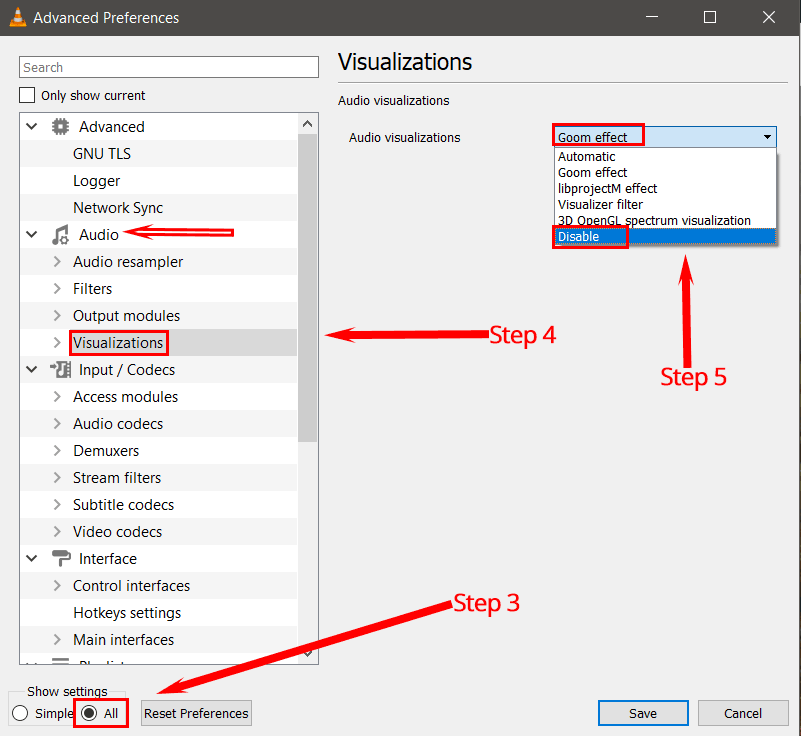
    Step 3: Now go to Audio Settings. Select show settings to ‘All.’

    Disable visualizations from Audio visualizations settings in VLC

    Step 4: You will find many options here. Go to settings from the sidebar menu and select Visualizations.

    Step 5: Click on the drop-down menu in Audio Visualizations and select Disable. Click on the Save button to save all your applied changes.

    This solution has worked for me, and I hope your issue will get resolved too. If you face any problems, then let me know in the comments.

    You might also find these posts helpful:

    How to set a video as your desktop wallpaper using VLC

    Stream YouTube videos directly through VLC

  • How and Where to Buy Books in Pakistan?

    How and Where to Buy Books in Pakistan?

    If you want to buy books in Pakistan, then there are very few bookstores to select from. In this post, I will share some of the best bookstores I use to buy books in Pakistan. Most bookstores on this list have a website where you can browse and buy a book. They will deliver your book within the next few days.

    Most of us are going through tough times after Covid-19. Instead of watching TV and horrifying news, a better way to spend your time is reading a book.

    Where to Buy Books from Bookstores in Pakistan

    1. Readings

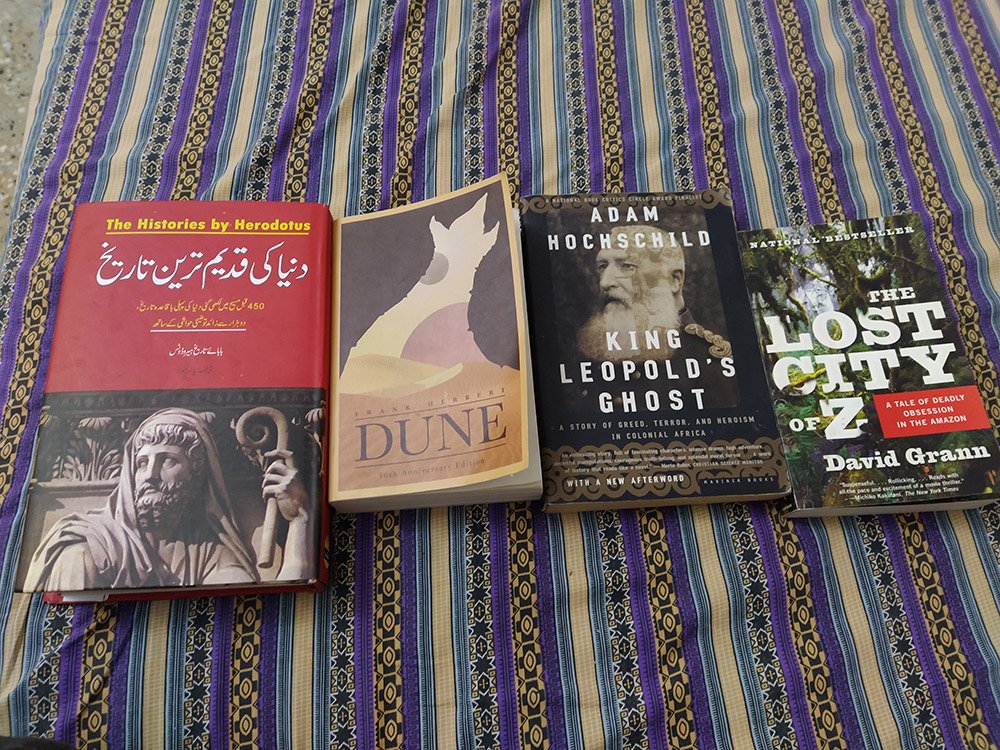
    This is one of my favorite online bookstores. However, their physical store is only situated in Lahore. Most of the books I own I purchased from Readings. They have a vast collection of books on their website. You can easily find the world’s bestsellers that you won’t find anywhere online/offline in Pakistan.

    Their customer support is top-notch, and I receive my order on time whenever I order a book. They sell books at a very reasonable cost, and I never had issues with their price.

    You can also visit their bookstore if you live in Lahore. Here’s the address:

    2. Liberty Books
    When I don’t find a book on Readings, my second go-to bookstore is Liberty Books. Their prices are a little higher when you compare them with other bookstores. However, you don’t care about the price when you badly want a book.

    Their website is user-friendly, and you can effortlessly search any titles through their site-search feature. They have physical bookstores across many cities in Pakistan. You can visit their stores and buy from them if you like.

    3. Global books

    They sell mainly used books in excellent condition. I purchased just a few books from them and had a good experience. If you want to buy books at a reasonable cost, this is the bookstore that you should check out.

    They don’t have a physical bookstore (as far as I know), so you are only left with buying online. Their website is a little dated, and the search feature never found the book I wanted.

    The best thing, though, is their prices are pretty low, and you can easily find some bestsellers if you browse for some time.

    4. Paramount Books

    I bought one book from them and had a good experience. They also sell course books for Medical, law, pre-primary, primary, and secondary education. You can find many fiction/non-fiction books if you browse their website thoroughly.

    Also, you can visit their bookstores offline in many cities across Pakistan.

    5. Welcome Book Port

    This is a well-known bookstore situated at Urdu Bazar, Karachi. You can buy mostly Urdu books from many publishers. They have many books, from Urdu poetry, humor, novels, and Islamic texts. You might find a few English titles published within Pakistan.

    I have bought many books from them for years by visiting their bookstore. They have recently started their online store, so if you want, you can purchase books from them through the website. I tried their online book delivery service, which was beautiful; I ordered a book at night and received it by the following afternoon.

    6. Ferzon Sons Publications

    They are perhaps the oldest publishers that I know of. They mostly have books for children both in Urdu and English language. You can visit their bookstores in various cities across Pakistan. You can try their online store if you like, but you won’t find much variety. Though their service quality is fantastic, you will get the books quickly.

    7. Oxford University Press

    I recently bought a book in Urdu from the Oxford University Press. Although it appeared out of stock on their website, when I contacted them by phone, they arranged the book for me and delivered it in 4 days.

    On their website, they have books on a variety of topics. They have fiction, non-fiction, and academic books. They have physical bookstores throughout Pakistan so that you can buy books offline.

    8. Sang-e-Meel Publications

    They have a fantastic collection of books. I bought some books from them long ago from their physical store. However, their online store has a wide variety of books in Urdu and English.

    Also, you can find their physical stores in many cities across Pakistan. You should visit their website to get more information about the bookstore locations.

    9. Vanguard Books

    This bookstore is situated in Lahore. However, they have a website from where you can buy any book. They deliver books across Pakistan. I have purchased some books from them and had a good experience. Their customer support was slow, and the order process seemed a little tricky.

    However, they are a credible bookstore so you can buy from them without hesitation.

    Import Books from Abroad to Pakistan

    If you don’t find a book you need in the above bookstores, here are a few websites I have used myself. You can order any used book from them, and they will deliver the book within 30 – 45 days via local post (Pakistan Post).

    They ship each book as a new package to save the shipping cost. They will send you two different packages if you order two books in a single order.

    I ordered three books from them and received only two books. I didn’t receive one book to this day from my order. However, when I told them, they gave me a refund without any questions asked.

    Note: You have to use a credit card to buy any book from them.

    Here are the websites that I have used to buy books from them and receive them in Pakistan.

    I hope you find this post helpful. If you find anything wrong with this post or want me to add a missing bookstore, please leave a comment below.

  • How to Find Freelance Work Using Content Marketing

    How to Find Freelance Work Using Content Marketing

    Many freelancers ask me how I can get projects consistently without looking for work. This is the answer to your question. You can get more freelance work by using content marketing.

    But how do you find more freelance work? Maybe, you’re not a great writer, or perhaps you don’t even know what’s a blog or how to create one.

    I am going to answer all your questions. Let me start with the very basics.

    What is content marketing?

    Any content you create brings people closer to your business, whether you publish content on a blog, LinkedIn post, Facebook video, YouTube, or thousands of other platforms.

    Millions of businesses use content marketing to generate leads. Some are pretty effective at it, and some barely scratch the surface.

    The key to content marketing is to write content for a particular audience and help them do certain things.

    Helping is an integral part of content marketing. At least initially, you don’t need to ask readers to hire you.

    You bring them closer to your brand by solving one of their problems. You don’t even need to advertise yourself on the blog. Yes, if you’d do that, it would help. However, you can use many ways to convince your blog reader that you’re a big deal.

    One of the important ways to bring your blog readers closer to you is by getting their emails. However, getting subscribers to your email list is not easy. It would help if you constantly found creative ways to get more subscribers to your email list.

    Email is where all the magic happens.

    But how do you get potential clients’ email?

    No one is interested in receiving your boring newsletter. That’s a fact! Because they don’t see any benefit in subscribing to your newsletter.

    So an effective way to get emails is to offer them something for free. This thing you submit must have an actual value. Such as, you can offer them a free ebook, a 50% discount on anything (not necessarily your service)

    • It needs to be extremely helpful.
    • Something that costs money but you’re giving away for free.
    • Free software trials

    How Content Marketing Can Help You Find Freelance Work

    It won’t for some time. If you are a good copywriter, you might get a fair advantage over folks like us who write 500 words in 8 hours.

    It would help if you were patient. It will take months, and you won’t see results unless you’re a good writer.

    Start a blog on any topic you are crazy about, and create a page where people can hire you. Be specific about your rates, tell your prospects a complete hiring process, add reviews, and use best copywriting practices to convince them to hire you.

    Learn SEO by following top blogs in your niche. Look at what they are doing and replicate them. Get links from quality websites by getting your content published. You don’t need to beg for backlinks. You post the most helpful content out there and promote it in any way you know. Social media marketing is also quite beneficial. Content promotion depends on where your audience hangs out.

    Suppose your target audience is an entrepreneur who runs multiple clothing brands. You can find them in many relevant communities online, such as Reddit, Facebook Groups, LinkedIn, Quora, and online forums.

    In the beginning, you might not get the desired results. Many of us don’t. However, you will grow if you consistently improve your blog and keep learning new things. Eventually, you will start getting calls or messages.

    This strategy has helped me immensely to get amazing clients. I hope you find out something valuable in this post. If you did, check out my other post on how to find freelance work using your portfolio.